Case study 02 / 06 · Van Cleef & Arpels · B2B + B2C
One console,feeding 5 products
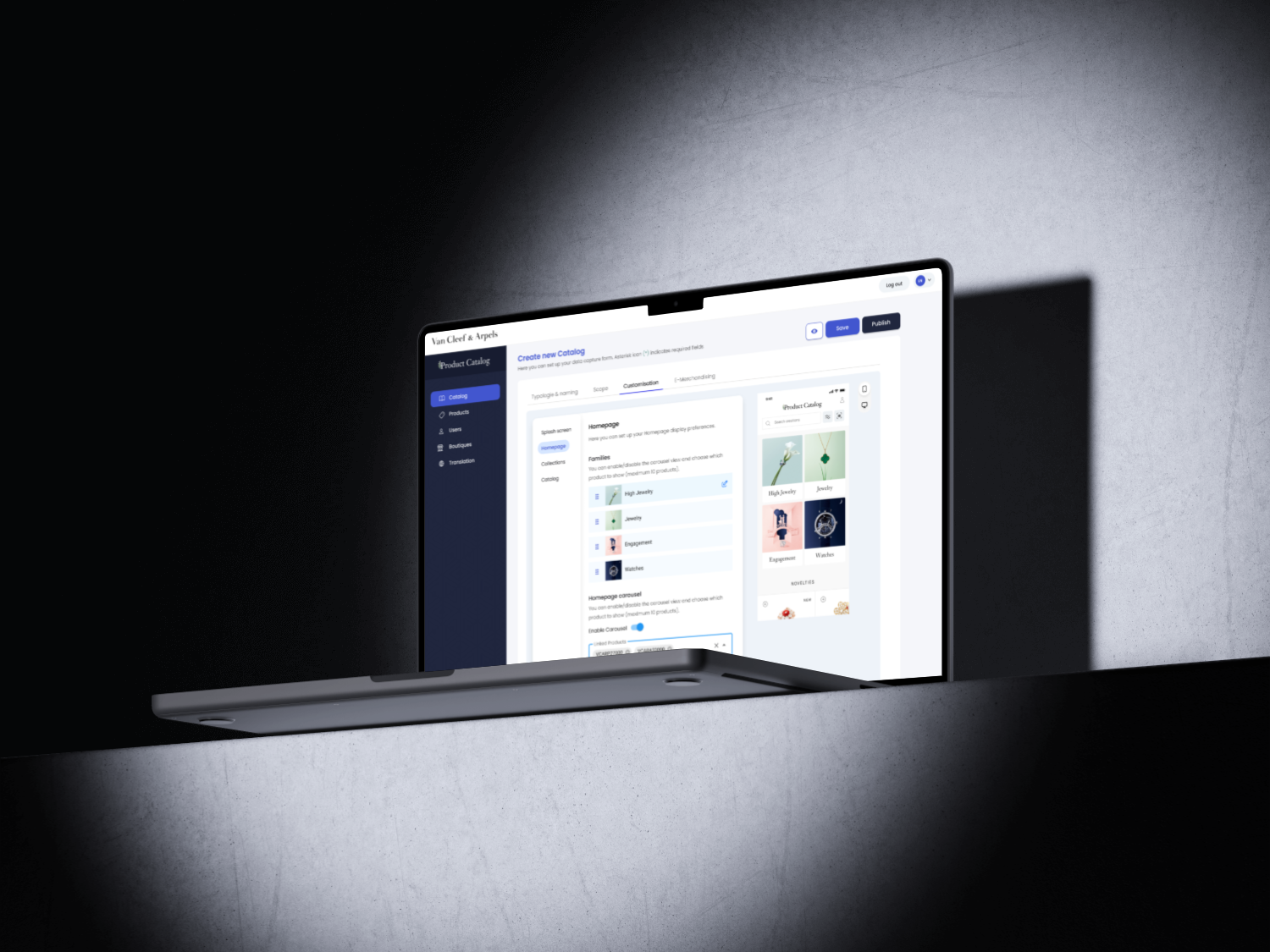
Van Cleef & Arpels kept its product data in separate tools owned by different IT teams, so every app showed something slightly different. I designed one back-office console that feeds five products, for sales teams in boutique and for clients, from private events to a VIP High Jewelry app.
In 30 seconds
- 5products fed by one console
- −40%research time, with an AI workflow
- +20%handoff efficiency across touchpoints
- B2B + B2Cfor sales teams and for VIP clients
- The problem
- Product data was different in every tool, so sales teams couldn't trust it in front of clients.
- What I did
- I designed it end to end: framing, personas, story mapping, user flows, every console module, and an AI-assisted workflow.
- The result
- The console became the single source of truth for product data, feeding 5 products for sales teams and clients.
- Role
- Design Tech Lead, end to end
- Team
- Internal IT teams, brand stakeholders
- Client
- Van Cleef & Arpels
- Product
- Web console → 5 B2B & B2C products
Every team had its own copy of the truth
Product information lived in many platforms, each owned by a different IT team. The same product could show different details, visuals or availability from one tool to the next. Small differences, but they break trust in front of a client and make a luxury experience feel inconsistent.
Inconsistent experience
Details, visuals and stock differed from one platform to another.
Delayed information
Updates were copied by hand between tools, so data was often out of date.
Slow internal workflows
Sales teams jumped between apps and still lacked complete, real-time data in front of clients.
The question I set out to answerHow might we give every sales team complete, real-time product data from one source, without content teams depending on IT?
What the business needed
- One source of truth for every product
- No more manual updates between tools
- Better service in front of clients
What users needed
- Sales: complete product info on mobile and tablet
- Content teams: set up a catalog without IT
- Admins: manage users and boutiques by region
Constraints
- Several IT teams and legacy platforms
- Boutiques, call centers and events all differ
- Data must stay in sync in real time
One console, five products
Instead of fixing each app one by one, I designed one back-office console as the single source of truth. Content teams set up the product data once, and the console feeds five products: tools for sales teams in boutique, and experiences for clients, from the in-store tablet to the private High Jewelry app.
- B2B + B2C
In-store catalog
On a boutique tablet, with sales associates and clients
- B2B
In-store data capture
Sales associates, boutique
- B2B
Catalog in the clienteling app
Advisors, worldwide
- B2C
Event forms
Clients at private events
- B2C
High Jewelry app
VIP clients, private catalog & house prices
Very different users, one source of truth
The hardest part was designing for very different people. I mapped four personas, then dug into the specific use cases of each one to define a short, focused feature set.

In the call center
Advises clients on the phone: product information, stock in regional boutiques and online, and eventually triggering orders.

In the boutique
Needs technical details, prices, stock and visuals to advise clients in store or prepare a client presentation.

In the office
Uses the app on any device, with the same information as sales associates, plus worldwide stock.

At an event
Needs practical event information as soon as the app opens, on top of every usual sales feature.
Three insights that shaped the product
The real problem wasn't the apps. Each team owned a different copy of the truth.
designed one back-office as the single source, and made every sales app read from it.
A boutique, a call center and an event don't need the same catalog.
designed a catalog generator: one console creates a dedicated catalog app (a URL) for each use case. The complexity moves to the admin side, so I invested in guidance there.
The people setting up catalogs aren't technical, and a mistake shows up in front of clients.
added a live mobile preview, in-app guidance and separate Save and Publish steps. One extra step, worth it because errors are costly.
The global user flow of the console
Before drawing any screen, I mapped the global user flow of the admin console: how a content manager creates, configures, previews and publishes a catalog, and how an admin manages users and boutiques. Every path ends in the same place: data that goes live in the five products.
View as text
- Content manager. Sign in → catalog dashboard → create a new catalog (name, audience, scope) or open an existing one → configure families, order and carousel → collections and assets → live mobile preview → if not ready, edit again; if ready, save and publish → the catalog is live in the 5 products.
- Admin. Sign in → admin area → manage users (type, country, rights) or boutiques (region, country) → the same access applies in every product.
How I used AI to design faster
I used AI across the whole design process to shorten research and keep the design connected to real data.
Perplexity & NotebookLM
Deep research on the products and on user behavior, then synthesis in Google NotebookLM.
Claude + Figma API + Make
Mostly done with Claude: components fed with live product data, copy, prices and variants.
MCP
Design system updates in natural language, including Dark Mode variants.
Foundations built on Material UI
I built the console on Material UI design kits, so the developers could reuse proven components, with a small set of color tokens on top.
- Primary#4256D0
- Secondary#1F263E
- Tertiary#F0F4F7
- Gray#DEE4E9
- Gray neutral#EFEFEF
The admin console, module by module
Six modules let non-technical teams run every catalog without IT. Click any screen to see it in full.
Catalog dashboard
Create, search and filter catalogs by name, user type (internal, client, sales advisor) and scope (boutique, call center, event). Each entry shows which product information goes to which audience.
Catalog configuration
Reorder product families like High Jewelry, turn them on or off, and set the homepage carousel. A live mobile preview shows every change instantly, with separate Save and Publish actions.
Collections
Edit each collection: upload a representative image, name it and activate or deactivate it in the app's navigation.
Assets
Add new images and videos, or link existing ones to a collection or any customizable element.
In-app guidance
Messages, tooltips and feedback help content creators feel confident and work faster, without training.
Users & boutiques
Admins manage app users (search and filter by user type and country, edit or delete) and every physical boutique by region and country.
What changed for the group
The data capture CMS became the single source of truth for product data across Van Cleef & Arpels, and live data sync replaced manual update loops between teams.
handoff efficiency across all touchpoints
research cycle time via AI-assisted workflows
fed by one console, for sales teams and clients, up to the VIP High Jewelry app
What I learned
Accessibility & inclusion
- Guidance instead of training.
- Preview before anything goes live.
- Mobile and tablet first for the floor.
On enterprise tools, the admin experience is the product.
Optical Center: an intent-first store locator with AI
From “where is the nearest store?” to “where is what I need, right now?”.
Read the case study